





What goes in a churn & retention dashboard in Metabase?
A churn & retention dashboard shows where recurring revenue leaks and how much of it you keep. It's the counterweight to the MRR dashboard: growth only compounds if churn stays low. Build it from billing data synced into a database — see Stripe, Chargebee, or Recurly for the connection.
For: Finance, RevOps, product leaders. Refresh: daily. Source: a monthly MRR model plus subscription cancellation events and reasons.
What does a churn & retention dashboard look like?
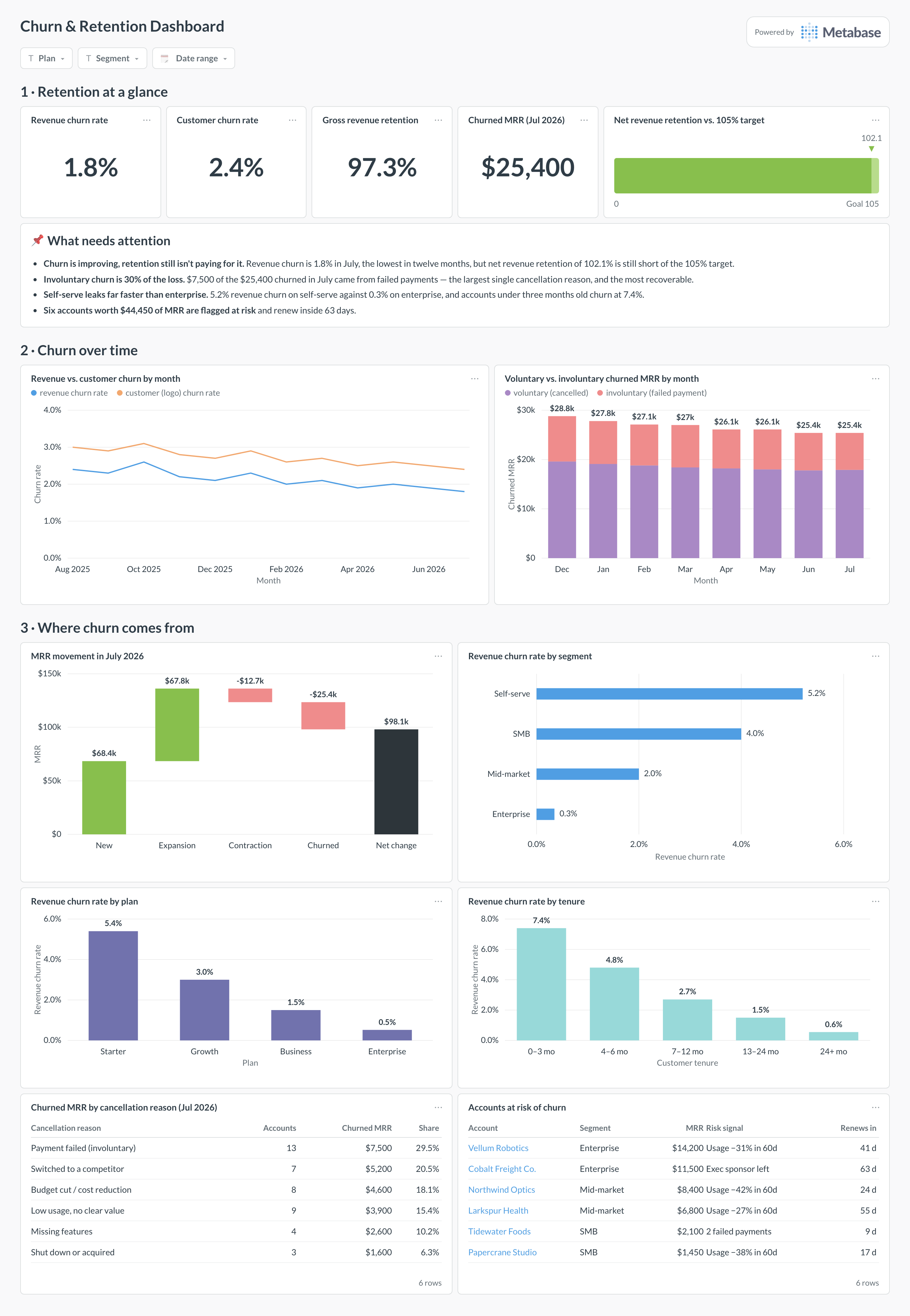
Here's the layout this guide builds: the retention headline first — revenue and logo churn, gross revenue retention, and net revenue retention against its target — then churn over time, then the cuts that say where the leak is. Read the top row monthly, and the segment, plan, and tenure cards when the headline moves.
Which cards belong on a churn & retention dashboard?
Headline KPIs
- Revenue churn rate (this month)
- Customer (logo) churn rate
- Net revenue retention
- Gross revenue retention
Trend & breakdown
- Revenue vs. customer churn by month
- Voluntary vs. involuntary churn — cancellations vs. failed payments
- Churn by plan, segment, and tenure
- Churned MRR by cancellation reason (table)
What data does a churn & retention dashboard need?
- A monthly MRR model for revenue churn and NRR.
- Subscription start and cancellation/expiry timestamps for customer churn.
- A cancellation reason or type to split voluntary from involuntary churn.
- Plan, segment, and signup-cohort attributes for the breakdowns.
How do you build a churn & retention dashboard?
- Sync your billing tool into a database (Stripe, Chargebee, or Recurly).
- Model monthly MRR and measure loss against the cohort that existed at thestart of each period, not the end.
- Tag cancellations by cause so voluntary and involuntary churn separate.
- Create one card per metric; add filters for plan, segment, and date.
Example card SQL
Revenue churn and net revenue retention by monthPostgreSQL
-- Revenue churn and net revenue retention by month,
-- from a monthly MRR model.
WITH by_month AS (
  SELECT
    month,
    SUM(mrr)                                              AS mrr,
    LAG(SUM(mrr)) OVER (ORDER BY month)                   AS start_mrr,
    SUM(churned_mrr)                                      AS churned_mrr,
    SUM(expansion_mrr)                                    AS expansion_mrr,
    SUM(contraction_mrr)                                  AS contraction_mrr
  FROM modeled_mrr
  GROUP BY month
)
SELECT
  month,
  ROUND(100.0 * churned_mrr / NULLIF(start_mrr, 0), 2)    AS revenue_churn_pct,
  ROUND(100.0 * (start_mrr + expansion_mrr - contraction_mrr - churned_mrr)
        / NULLIF(start_mrr, 0), 2)                        AS nrr_pct
FROM by_month
ORDER BY month;
Related
Integrations
Analytics
Dashboards
Metrics
FAQ
What's the difference between gross and net revenue retention?
Gross revenue retention counts only what you keep from existing customers — it can never exceed 100%. Net revenue retention adds expansion back in, so it can exceed 100% when upsell outweighs churn. Show both: GRR reveals the leak, NRR reveals whether expansion is covering it.
Should I report revenue churn or customer churn?
Both — they tell different stories. Revenue churn weights each loss by its MRR, so one big account dominates; customer (logo) churn counts accounts equally and is a better product-market-fit signal. A dashboard that shows only one hides half the picture.
Why separate voluntary and involuntary churn?
Because the fixes are completely different. Voluntary churn (someone chose to cancel) is a product and value problem; involuntary churn (a payment failed) is a dunning and card-update problem — see the failed payments dashboard. Blending them hides an often-recoverable chunk of lost revenue.
How do I avoid churn rates that look artificially low?
Measure churn against the cohort that existed at the start of the period, not the end — otherwise new signups dilute the denominator and mask the problem. Keep the window (monthly vs. annual) consistent, and don't naively multiply monthly churn by 12.